Published Jun 7, 2026 · 10 min read
The 64 KiB Pipe That Killed Our Database
Part 2 of the Scaling CouchDB to 1 Million Requests Per Minute series - The story of how a 64 KiB pipe between CouchDB and containerd led to OOM a production node.

We collected CouchDB logs the normal Kubernetes way. CouchDB wrote to the container’s stdout/stderr stream, the container runtime wrote that stream to a file on the node, and our pipeline picked it up from there. Then one day, a CouchDB pod stopped showing logs.
The database was still serving. Disk IO was nowhere near its EBS limits. But the Erlang VM’s message queue began climbing without bound, memory chased it, and the pod OOM’ed. Then it happened again. And two weeks later, a third time.
This is the story of how a 64 KiB pipe between CouchDB and containerd took down a production database, and why a database going quiet turned out to be the most important signal it sent.
What We Saw
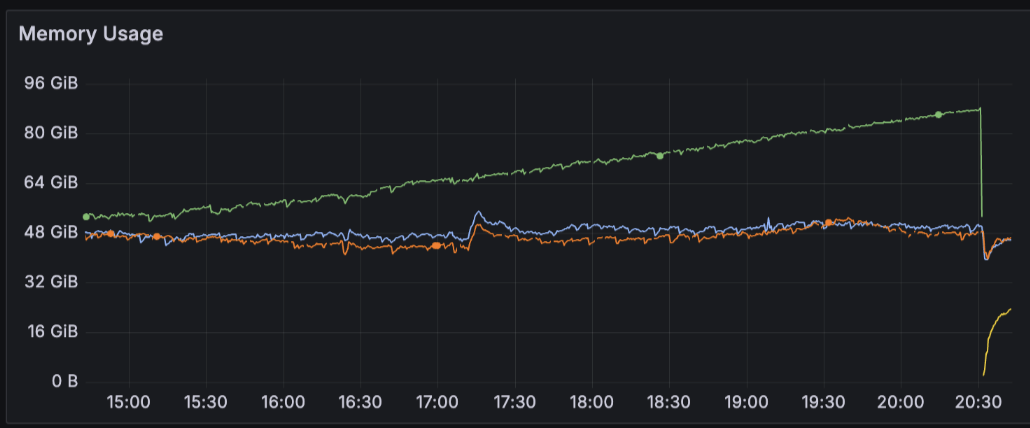
One of our CouchDB pods restarted around 8:30 PM after an OOM. At that point, we did not have enough metrics to explain the failure.

During downtime, CouchDB returned fabric_worker_timeout errors because coordinator pods could not serve work tied to the restarted node.
At the time, we had just wrapped up a EMFILE error. We suspected it was related because we thought we had set a file descriptor count too high it contributed OOM failure. Turns out it wasn’t.
We tried to find the root cause but the gap in observability that time led us nowhere. That’s when we started scraping the _system metric endpoint exposed by CouchDB.
We enhanced the CouchDB dashboard with more runtime signals:
- Erlang VM garbage collection
- Erlang process memory
- scheduler queue
- message queue
Then few days later, it happened again. But this time the second incident was more revealing. The unbounded memory growth on one of the pods was there still, but we also saw the Erlang VM message queue metrics, which climbed to around 20 million queued messages:
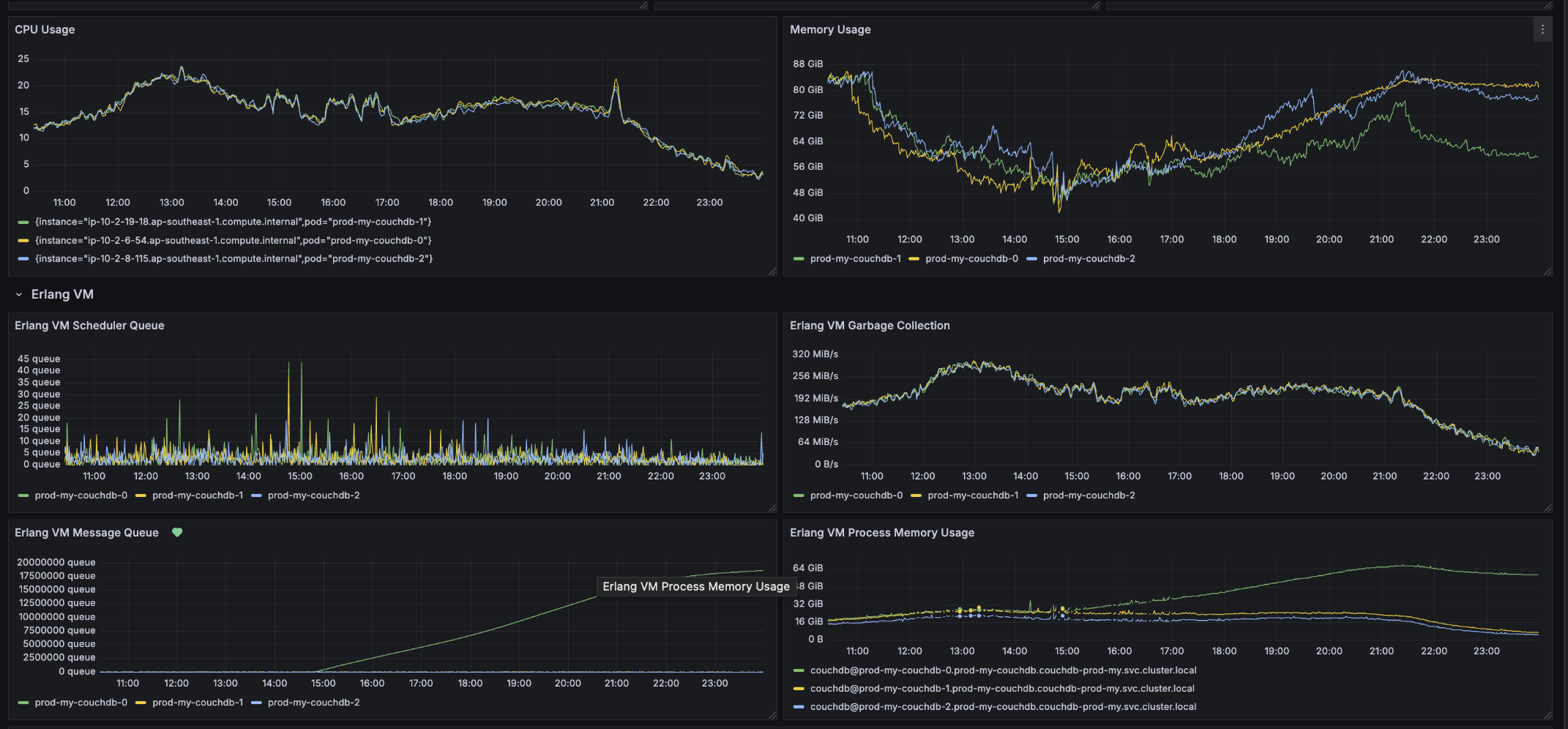
The timing was the important clue. The message queue growth started around 2:48 PM. Around the same time, the logging backend stopped receiving logs from that CouchDB pod. The logs-per-second metric still looked normal enough that we could not simply say the database had stopped logging internally (excuse the cutover in the graph, it’s related to our data retention that time):

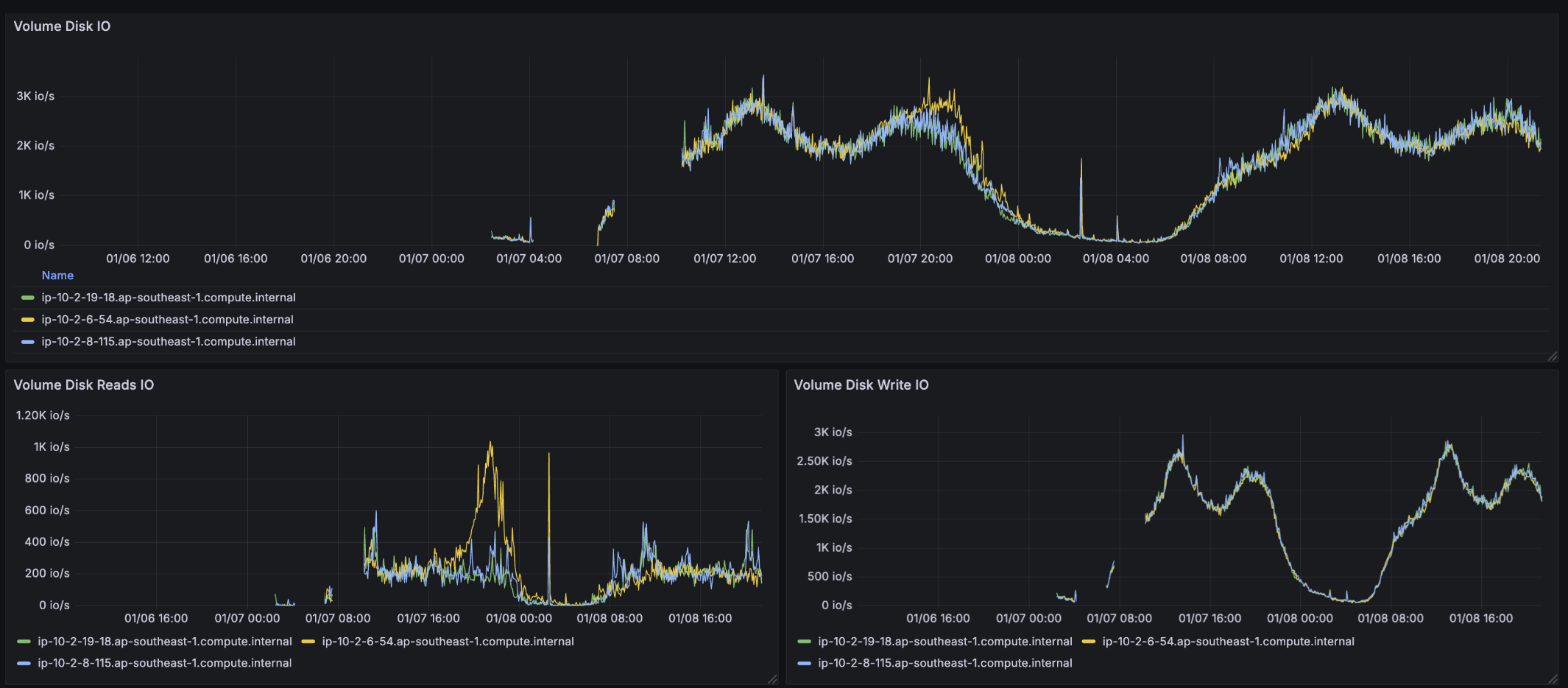
During same timeframe, disk IO metrics was also not saturated. The EBS volume supports up to 10k iops and also 250 MiB/s throughput. By cross checking with metrics, we disproved that Disk IO is the bottleneck:
But we found the visible failure was in the path from CouchDB to the logging backend:

We experienced the third occurrence 2 weeks later. The pattern was the same:
- explosive message queue growth
- logs disappearing
- disk IO still inside expected limits
- eventually a restart that caused user-visible degradation.
The working model became:
CouchDB work
        |
        v
Erlang processes emit log messages
        |
        v
CouchDB logging actor cannot drain fast enough
        |
        v
Erlang message queue grows without bound
        |
        v
memory grows until restart or OOM
That model fit the evidence, but it still left one hard question open: why did the CouchDB container output path stop draining in the first place?
We ruled out the obvious database-storage explanation: the EBS volume had 10k IOPS and 250 MiB/s throughput available, and the metrics did not show it hitting those limits during investigation.
Why This Hurt So Much
CouchDB is written in Erlang. Erlang systems are built around lightweight processes that communicate by sending messages. That model is powerful, but it also means a slow consumer can become a hidden memory problem.
If an actor accepts work faster than it completes work, its mailbox grows. If the mailbox holds messages that are still needed, garbage collection will not save you. The memory is not garbage. It is queued work.
That is why normal GC metrics did not disprove the issue. They actually made the picture clearer: memory was growing because the runtime still had references to queued logging work. The system did not look like it was leaking unreachable memory. It looked like it was faithfully preserving a backlog.
The painful part is that the source of the backlog was related to log delivery. A database can survive losing some observability but it cannot survive logging becoming an unbounded in-memory queue inside the runtime.
Runtime Fundamentals
Before getting into containerd, it helps to separate the layers. Kubernetes does not run containers by itself. Kubernetes decides what should run. A container runtime does the node-level work of pulling images, creating containers, wiring their IO, watching their lifecycle, and reporting status back to Kubernetes.
On every Kubernetes node, kubelet is the node agent. kubelet watches the desired pod state from the API server and asks the local container runtime to make that state real.
That conversation happens through CRI, the Container Runtime Interface. CRI is the Kubernetes API between kubelet and the runtime. It lets Kubernetes support runtimes like containerd and CRI-O without hard-coding all runtime behavior directly into kubelet.
In our production CouchDB environment, the relevant runtime is containerd. Our Karpenter nodes running for CouchDB is Bottlerocket-based, and Bottlerocket uses containerd as the Kubernetes container runtime.
So the simplified control path is:
Kubernetes API server
        |
        v
kubelet on the node
        |
        v
CRI request
        |
        v
containerd
        |
        v
container process
But logging is an IO path, not just a control path. When an application writes to stdout or stderr, that output has to leave the container somehow. In Kubernetes, the common model is:
application writes stdout/stderr
        |
        v
container stdout/stderr pipe or FIFO
        |
        v
container runtime reads the stream
        |
        v
runtime writes CRI-formatted pod log file on the node
        |
        v
kubelet and log collectors read from the node log files
That pod log file is why commands like kubectl logs work. kubectl is not connecting to the application process and asking it for logs. The log has already been captured by the node runtime path, written to disk in the Kubernetes log format, and exposed through kubelet.
Under the hood, stdout/stderr are file descriptors attached to kernel IO primitives like pipes and FIFOs. Those buffers are finite. If the reader does not drain them, the writer can eventually block.
For most stateless applications, blocking on stdout may show up as slow requests, stuck workers, or a frozen process. CouchDB made the problem look stranger because application work did not write directly to stderr on every request. CouchDB queued logs into its own Erlang logging process first. That turned a runtime IO stall into an Erlang mailbox backlog.
Reading The Code Path
To understand how this failure was allowed to happen, read the code path as a chain of small blocking contracts. No single layer is doing something absurd. The incident appears when each layer keeps its own local promise and those promises compose badly.
1. CouchDB makes logging asynchronous for callers
In CouchDB 3.3.3, normal logging does not make every request process write directly to stderr. It sends the entry to couch_log_server:log/1.
Reduced from couch_log_server.erl:
log(Entry) ->
    gen_server:cast(couch_log_server, {log, Entry}).
That one line creates the first important queue. A CouchDB worker can say “please log this” and continue. It does not have to wait for the log line to reach the operating system.
The receiver is a single gen_server. It processes one mailbox message at a time:
handle_cast({log, Entry}, State) ->
    Writer2 = couch_log_writer:write(Entry, State.writer),
    {noreply, State#st{writer = Writer2}}.
The shape is:
many CouchDB processes
        |
        v
async cast
        |
        v
one couch_log_server mailbox
        |
        v
one log write at a time
This design is reasonable. It keeps normal request paths from synchronously formatting and writing every log line. But it also means couch_log_server is the only consumer of its mailbox. If that process blocks, the mailbox has no second worker to help drain it.
2. The default CouchDB writer is synchronous stderr
The default writer for CouchDB logs is stderr. The stderr writer couch_log_writer_stderr:write/2 formats the log entry and writes it to Erlang’s standard_error device.
Reduced from couch_log_writer_stderr.erl:
write(Entry, State) ->
    Data = format_prefix(Entry),
    Msg = entry_message(Entry),
    io:format(standard_error, [Data, Msg, "\n"], []),
    {ok, State}.
That is the first blocking point. The call into standard_error is inside couch_log_server. If that write waits, couch_log_server waits. While it waits, it does not handle the next gen_server:cast.
So CouchDB has this internal contract:
callers enqueue quickly
logger writes synchronously
mailbox absorbs the difference
That is fine while the synchronous write is fast. It becomes dangerous when the write target can block for a long time.
3. In Kubernetes, stderr is not the final destination
Inside a Kubernetes container, fd 2 is not “the logging backend.” It is not even the pod log file. It is the process’ stderr stream, connected to runtime-managed IO.
The practical path is:
CouchDB fd 2
        |
        v
container stderr FIFO
        |
        v
containerd copy goroutine
        |
        v
containerd CRI logger
        |
        v
/var/log/pods/.../0.log
        |
        v
collector
        |
        v
logging backend
That means the CouchDB stderr write can be affected by a problem that is upstream of the collector and upstream of the logging backend. If containerd has not safely drained the bytes into the pod log file, backpressure can still reach CouchDB.
4. containerd bridges the FIFO into the CRI logger
containerd’s Unix IO code opens runtime FIFOs and copies stdout/stderr into configured output writers.
Reduced from containerd’s copyIO Unix IO path:
go copyBuffer(stdoutLogger, stdoutFIFO)
go copyBuffer(stderrLogger, stderrFIFO)
That means there is a goroutine whose job is to read the container stderr FIFO and write those bytes into the logger returned by containerd’s CRI logging code.
The CRI logger then creates a Go pipe and starts a redirect goroutine:
reader, writer := io.Pipe()

go redirectLogs(reader, podLogFileWriter)

return writer
Now there are two connected stages:
stderr FIFO
        |
        v
copy goroutine writes to Go io.Pipe writer
        |
        v
redirectLogs reads from Go io.Pipe reader
A Go io.Pipe is synchronous. It is not a large durable queue. If the reader side stops reading, the writer side blocks.
5. containerd writes each CRI log record to the pod log file
Inside redirectLogs, containerd reads a line, builds the CRI log record, and writes that record to the provided writer.
Reduced from containerd’s CRI logger:
for {
    line := readLine(reader)
    record := formatCRIRecord(line)
    record.WriteTo(podLogFileWriter)
}
The write is on the critical path. redirectLogs cannot read the next line until the current record write finishes.
The pod log writer is shared by stdout and stderr. containerd wraps the pod log file in a NewSerialWriteCloser so concurrent stdout and stderr writes do not interleave:
func Write(data []byte) {
    lock()
    file.Write(data)
    unlock()
}
That gives us the exact source-level choke point:
redirectLogs
        |
        v
format one CRI log record
        |
        v
take serial writer lock
        |
        v
write to /var/log/pods/.../0.log
        |
        v
only then read the next line
If the node pod-log file write is fast, everything works. If that file write becomes slow or blocked, the entire chain behind it slows down:
pod log file write slow
        |
        v
redirectLogs cannot read Go io.Pipe
        |
        v
copy goroutine cannot write Go io.Pipe
        |
        v
copy goroutine stops reading stderr FIFO
        |
        v
Linux FIFO fills
This is the most important containerd finding. It is not “containerd stores logs in memory until later.” It is “containerd’s CRI logger must keep writing the pod log file in order to keep draining the container FIFO.”
6. Linux turns slow drain into a sleeping writer
At the bottom of this chain is the Linux pipe/FIFO behavior. A FIFO uses pipe semantics once it is opened. The kernel tracks a small ring of pipe buffers in struct pipe_inode_info:
struct pipe {
    wait_queue rd_wait;
    wait_queue wr_wait;
    unsigned int head;
    unsigned int tail;
    unsigned int max_usage;
}
The default capacity is usually PIPE_DEF_BUFFERS, which is 16 pages. With 4 KiB pages, that is about 64 KiB. That is enough for a burst, but tiny compared with a busy database’s log stream.
The writer-side logic in pipe_write() can be reduced to:
if no_readers:
    return EPIPE

if has_space:
    copy_bytes_into_pipe()
    return bytes_written

if nonblocking:
    return EAGAIN

sleep_until_pipe_is_writable()
retry
The branch that matches our incident is the last one. CouchDB’s fd 2 was a blocking stream. containerd still existed as the reader. The pipe was full. So Linux did not return EPIPE, and it did not return EAGAIN. It parked the writer until the pipe became writable again.
The reader-side logic in pipe_read() is the mirror image:
if pipe_has_data:
    copy_bytes_to_reader()
    advance_tail()
    wake_waiting_writers()
The only normal recovery path is for containerd to read enough bytes from the FIFO to advance tail, which wakes writers sleeping on wr_wait.
7. The end-to-end failure mode
Now put the code contracts together:
CouchDB workers
  can enqueue logs asynchronously

couch_log_server
  consumes that queue one message at a time

CouchDB stderr writer
  blocks until fd 2 accepts the log bytes

Linux FIFO
  accepts bytes only while its small ring has capacity

containerd copy goroutine
  drains the FIFO only while it can write into the CRI logger

containerd redirectLogs
  reads the next line only after it writes the current CRI record

containerd pod-log writer
  writes synchronously to /var/log/pods/.../0.log
The failure does not require a thrown exception. It only requires the service rate at the pod-log write step to fall below the rate CouchDB is feeding logs into stderr.
The moment the pod-log writer falls behind long enough, the downstream queues saturate in order:
pod log file write slows
        |
        v
Go io.Pipe stops draining
        |
        v
containerd stops draining stderr FIFO
        |
        v
Linux FIFO reaches capacity
        |
        v
CouchDB stderr write sleeps
        |
        v
couch_log_server stops consuming mailbox
        |
        v
Erlang mailbox becomes the new queue
This explains the sharp transition. Before the pipe fills, couch_log_server can keep moving. After the pipe fills, couch_log_server is not merely slower. It can be parked inside one write. From that point forward, new log messages are not trickling through to containerd. They are accumulating before stderr, inside CouchDB.
That is also why “no logs at all” is compatible with CouchDB still doing work. The workers are not blocked on the logging call because their side of logging was asynchronous. The one process that turns those queued messages into stderr bytes is blocked.
The Containerd Clue
The open-source issue tracker points in the same direction.
On December 12, 2024, a containerd issue was opened titled “Container logs are missing when disk I/O wait time is high”. The report described a mismatch between cri_input_entries_total and cri_output_entries_total during high disk I/O. The reporter traced the path through containerd’s CRI logger: containerd creates a logger for stdout/stderr, reads through redirectLogs, and writes to the pod log file through a synchronized writer.
The important part for our incident is not only “logs can be missing.” It is the backpressure question the reporter asked: if the CRI logger cannot read fast enough from the pipe, does the container get blocked from writing to stdout? That is exactly the question our CouchDB incident raises, except our application made the blockage visible as an Erlang mailbox rather than as an immediately stuck request thread.
A companion issue, also opened on December 12, 2024, reported missing logs from /var/log/pods/.../0.log. That investigation described the same pipe shape: container stdout maps to a pipe on the node, and containerd reads it and writes the pod log file. The reporter called out the small pipe buffer and synchronous write path, and suspected either pipe throughput, IO channel handling, or task/exec stream handling. The issue was still open when I checked.
There is also an open containerd/fifo pull request to resize FIFO capacity to 1024 KiB. The pull request text is blunt: a container that writes logs synchronously to stdout or stderr can be blocked in some scenarios, so the author argues the runtime FIFO should be larger. That does not prove our production incident had the same trigger, but it validates the class of failure: stdout/stderr is not an infinite fire-and-forget channel.
Kubernetes has its own nearby issue, but at a different layer. Kubernetes issue #110630 reported that kubelet did not respect container-log-max-size quickly enough when containers wrote logs heavily. The fix, merged as #114301, added configurable parallel log rotation workers and a configurable monitor interval. That issue is about delayed rotation, not containerd’s FIFO itself. But it matters because delayed rotation can let pod log files grow far beyond their configured size, increase node disk pressure, and make the runtime log writer slower.
So the layer map looks like this:
Linux pipe/FIFO
  finite buffer; writer can block when reader stops draining

containerd CRI logger
  drains stdout/stderr FIFO and writes CRI-formatted pod log files
  issue tracker contains open reports about missing logs and disk-IO-related log loss

kubelet log manager
  manages rotation cadence and concurrency for container log files
  historical bug allowed heavy log writers to outrun rotation

node filesystem / disk IO
  if slow or pressured, can slow the CRI writer that containerd depends on

logging backend / collector
  downstream ingestion can explain missing logs in the backend
  but by itself it does not explain CouchDB's internal Erlang mailbox growth
That is why I think the best current hypothesis sits between containerd and node IO, with Linux pipe semantics providing the backpressure mechanism. The suspicious path is:
containerd CRI writer slows or stalls on node log output
        |
        v
containerd drains CouchDB stderr FIFO too slowly
        |
        v
CouchDB's stderr write blocks
        |
        v
couch_log_server mailbox grows
The open question is what started the stall. It could have been node disk IO latency, kubelet rotation contention, containerd’s synchronized log writer, FIFO sizing, or an interaction among them. The incident notes ruled out the CouchDB EBS data volume as the bottleneck, but they did not capture the node’s /var/log/pods filesystem, containerd metrics, kubelet rotation state, or containerd stacks at the moment the pipe stopped draining.
The Numbers: How Much Has To Drain
The reader does not need to drain the pipe completely. It needs to free enough capacity for the blocked write to make progress.
The key numbers are:
- Linux page size on common x86_64 / EKS nodes: 4 KiB.
- Linux default pipe capacity:
PIPE_DEF_BUFFERSis 16 pages, so the typical default capacity is16 * 4096 = 65,536bytes. - Linux
PIPE_BUFatomic write threshold: 4,096 bytes, documented inpipe(7). - containerd CRI logger read buffer:
defaultBufSize = 4096. - containerd default
max_container_log_line_size:MaxContainerLogLineSize: 16 * 1024, which is 16,384 bytes. - CouchDB default log
max_message_size:"16000", with fallback parsing to16000. /proc/sys/fs/pipe-max-sizedefault ceiling: 1,048,576 bytes, documented inpipe(7).
There are two different pipe numbers that are easy to mix up:
PIPE_BUF = 4 KiB
  atomicity guarantee for small writes

pipe capacity = usually 64 KiB
  total amount the pipe can hold before writers block
For a blocking write smaller than or equal to PIPE_BUF, Linux waits until the whole write can fit atomically. If CouchDB writes a 2 KiB log line and the pipe has only 1 KiB free, the write waits. It does not require the whole 64 KiB pipe to be empty. It needs at least 2 KiB free.
For a blocking write larger than PIPE_BUF, Linux can make progress in chunks, but the write call does not return to the caller until the requested bytes have been written, unless it is interrupted or hits an error. A near-maximum CouchDB log line can be around 16,000 bytes before formatting overhead. That is larger than PIPE_BUF, but smaller than the typical 64 KiB pipe capacity.
So the practical shape is:
64 KiB pipe capacity
16 KiB-ish CouchDB log line
4 KiB-ish containerd read chunks
If the pipe is almost full, containerd does not need to drain all 64 KiB. To let one 16 KiB log write complete cleanly, it needs to drain roughly enough bytes for that write, plus whatever overhead is in the formatted log prefix and newline. But if CouchDB is producing logs continuously, freeing one log line’s worth of space is not enough to recover. containerd has to drain faster than CouchDB refills the pipe.
That is the distinction:
local unblock condition
  free enough bytes for the pending write to advance

system recovery condition
  sustained drain rate > sustained CouchDB stderr write rate
In our incident, the system recovery condition appears to have failed. The pipe may have occasionally had small amounts of free space, but not enough sustained drain capacity for couch_log_server to catch up and keep up.
What We Proved vs What We Inferred
It is worth being precise about how much of this is source-backed and how much is inference from symptoms.
- Proven: CouchDB uses an async single logging server whose default writer writes synchronously to
standard_error. - Proven: Kubernetes/containerd logging depends on draining container stdout/stderr into node log files through containerd’s FIFO copy path and CRI logger.
- Proven: Linux pipes/FIFOs apply backpressure;
pipe_write()sleeps onwr_waitwhen a blocking pipe is full. - Likely: CouchDB’s logging server blocked on stderr because the container runtime’s stdout/stderr drain slowed below CouchDB’s log rate.
- Not proven: the exact component on the node that slowed first. We never captured
strace, containerd goroutine stacks, thecri_input/cri_outputcounters, or the node’s/var/log/podsfilesystem state during the incidents.
The Erlang queue growth is what narrows it down. Several things can make logs disappear, but only a few can make logs disappear and back up CouchDB’s internal mailbox:
slow runtime drain
  blocks the app-side write -> CouchDB mailbox grows   (fits our symptom)

competing reader on stdout/stderr
  steals bytes -> missing pod logs, but would not block CouchDB

downstream collector failure
  missing logs in the backend, but cannot block CouchDB
  once containerd has already written the pod log file
It was also the quiet failure mode, not the loud one: a vanished reader returns EPIPE and abrupt broken-pipe errors, but here the reader stayed alive and just drained too slowly, so the write simply slept. Nothing threw, which is why it was so hard to see.
The Solution: File Logging With A Sidecar
We added an alert on high Erlang message queue depth so SRE could intervene with a graceful restart during a low-traffic window instead of waiting for Kubernetes to restart the pod after OOM. That mattered because an ungraceful restart caused hours of downstream degradation.
The durable fix changed the shape of the logging path. We configured CouchDB to use the file log writer instead of the default stderr, mounted a dedicated log volume into the pod, and ran Fluent Bit as a sidecar that tailed the log file and shipped records to the logging backend through OpenTelemetry.
The shape becomes:
CouchDB writes to a file on a log volume
        |
        v
Fluent Bit sidecar tails the file
        |
        v
logging backend
The point of this change is not “Fluent Bit is better at logging.” It is that backpressure no longer crosses into CouchDB’s runtime. If the shipper slows down or the backend stops accepting writes, the pressure shows up as a growing file on a bounded log volume, a problem we can address with rotation, retention, and storage alarms. It is no longer expressed as an unbounded Erlang mailbox inside the database.
Implementation Gotchas
Log rotation is not a fire-and-forget knob. Configure logrotate with copytruncate so CouchDB can keep writing to the same file path while old generations are compressed and rotated out. Resist the temptation to run cron or dcron inside the sidecar to drive logrotate; both wanted minor coaxing to stay healthy as PID 1, and the moving parts were not worth it. A plain shell loop that sleeps until the next rotation window and then invokes logrotate is shorter, harder to break, and easier to reason about. Tuning has two axes: a size threshold (how large any one log file can grow before rotation) and a cadence (how often logrotate even checks). Start conservative and expect to tune both as you learn the application’s real log volume and the size of the volume backing the log path.
Move logs off the database data volume. The first version wrote the log file into the existing CouchDB data path. That worked, but it put database storage and operational exhaust on the same PVC, which means a runaway log can threaten the database. A natural second step is to use an emptyDir for the log path. That isolates writes from the data PVC, but it inherits the node’s ephemeral storage limits, and a slow rotation cadence can let the node evict the pod for using too much local storage. The steady state is a dedicated PVC for logs, sized for the retention you actually want, with rotation tuned to that volume. Logs are operational exhaust. They should be bounded and isolated.
Fluent Bit will choke on invalid UTF-8. Real-world CouchDB log lines contain bytes that are not valid UTF-8, and Fluent Bit’s pack stage refuses those records with invalid UTF-8 bytes found, skipping bytes. The fix is a small Lua filter that walks the log string byte-by-byte, preserves valid UTF-8 sequences, and replaces invalid bytes with ?. That keeps records flowing instead of being dropped silently somewhere in the pipeline.
Tail only the active log file. It is tempting to point Fluent Bit at couch.log* so the shipper can catch up across rotations. In practice that creates two problems. First, the glob will match compressed archives, and Fluent Bit will try to tail .gz files as if they were plain text, so set Exclude_Path *.gz to be explicit, or simply tail couch.log. Second, when the sidecar restarts, a wide glob causes the shipper to re-read recently rotated files and produces a startup ingestion storm. The conservative choice (tail only the active couch.log, and accept that some rotated content may be lost if the shipper is down during rotation) is the right tradeoff for a database where keeping the live signal flowing matters more than recovering every old line.
What Changed In The End
The final production shape looked like this:
CouchDB
  writes /opt/couchdb/logs/couch.log
        |
        v
dedicated EBS log PVC
        |
        +--> Fluent Bit tails active couch.log
        |        |
        |        v
        |    logging backend via OpenTelemetry
        |
        +--> logrotate compresses and bounds retention
The change had four parts:
- CouchDB stopped writing logs through the container output path and wrote to a file instead.
- Fluent Bit ran as a sidecar and became responsible for reading that file.
- Log storage moved onto a dedicated PVC so log growth could not directly consume the database data volume.
- Runtime metrics and alerts focused on the real failure symptom: Erlang message queue growth.
The Lesson
Logging is usually treated as a side effect. In this incident, logging became part of the database’s failure domain.
The lesson is not “always use a Fluent Bit sidecar.” The lesson is that high-volume stateful systems need bounded logging paths. If logs can accumulate inside the application runtime, logging is no longer observability. It is backpressure.
For CouchDB, the practical pattern became:
- monitor Erlang message queues, not only CPU and memory
- separate database data from log storage
- make log retention explicit
- avoid relying on a single stdout/stderr path when the application runtime can queue logging work internally
- treat disappeared logs as a possible database health signal, not only an observability pipeline issue
The strange part of this incident is that the missing logs were not the absence of evidence. They were the evidence.
Afterthought: Where AI Helped
This incident spanned three codebases in three languages we do not write daily: CouchDB’s logging path in Erlang, containerd’s CRI logger in Go, and the Linux pipe implementation in C. AI did not make the reliability decisions, but it cut the time spent getting to them in three places.
Reading code across languages
The claims in this post come from couch_log_server.erl, io_unix.go/logger.go, and fs/pipe.c. We are not Erlang, or kernel engineers. We pointed GitHub Copilot at the open-source repos and asked specific questions (does this gen_server:cast block the caller, does redirectLogs read the next line before or after the pod-log write returns) and got answers tied to the actual source with the relevant lines cited. That replaced days of learning each language’s idioms before we could trust what we were reading.
Writing the _system exporter
The first incident was hard because we could not see the symptom. The fix was a CouchDB _system metrics exporter. A production Prometheus exporter in Go is mostly boilerplate (a sidecar, retry logic with backoff, health and readiness probes, metric cardinality) which AI is good at scaffolding. With AI help it came together as a ~1,200-line Go service across four files: a retrying CouchDB client, a Prometheus collector, the _system type definitions, and an HTTP server on port 9984. It scrapes /_node/{node}/_system and exposes the signals this incident taught us to watch (couchdb_message_queue_size and the detailed couchdb_message_queue_p50/p90/p99, run-queue depth, GC counts, and process memory) plus compaction progress from /_active_tasks. The code is not novel. It just got us from blind to watching the Erlang mailbox quickly, which is what made the second incident diagnosable. Source code link
Researching Linux internals
The hardest claim to verify was the kernel one: that a full blocking pipe parks the writer instead of erroring. That meant reading pipe_write(), pipe_read(), pipe_writable(), and the pipe_inode_info ring layout, and confirming which kernel version applied. AI surfaced the right files and line ranges and explained PIPE_DEF_BUFFERS and the wr_wait/rd_wait wake path, but we read the source ourselves before marking anything “Proven”. AI got us to the right lines; we kept the call on what to claim.
What this freed up
This did not replace the SRE work, it removed the toil around it. The reliability decisions (alert on Erlang message-queue depth, move logging to a file with a sidecar, isolate the log volume onto its own PVC) are judgment calls about our system and our risk tolerance, and they stayed with us. AI absorbed the cost of understanding three unfamiliar codebases and standing up the observability to see the failure, so we could spend our attention on making the database reliable.
Source Notes
- CouchDB 3.3.3’s
couch_log_server, where logging is sent withgen_server:castand handled one message at a time. - CouchDB 3.3.3’s
couch_log_writer, where the default writer is resolved. - CouchDB 3.3.3’s
couch_log_writer_stderr, where logs are written tostandard_error. - CouchDB 3.3.3’s
couch_log_writer_file, where the file writer opens and writes the configured log file. - CouchDB 3.3.3’s
couch_log_config, which sets the default logmax_message_sizeto 16,000 bytes. - CouchDB 3.3.3’s
default.ini, which documentsstderras the default writer andfileas the logrotate-compatible writer. - Erlang/OTP’s
iodocumentation, which definesstandard_erroras the operating-system error output I/O device. - Kubernetes’ Container Runtime Interface documentation.
- Kubernetes’ Logging Architecture documentation.
- containerd 1.7.28’s CRI logger, where
NewCRILoggercreates a Goio.PipeandredirectLogswrites CRI-formatted records. - containerd 1.7.28’s Unix FIFO copy path, where stdout/stderr FIFOs are copied into configured output writers.
- containerd 1.7.28’s
DefaultConfig, which setsMaxContainerLogLineSizeto 16 KiB. - containerd 1.7.28’s
StartContainerpath, where stdout/stderr CRI loggers are attached to a shared serial pod-log writer. - containerd 1.7.28’s
NewSerialWriteCloser, which serializes writes with a mutex. - containerd/fifo’s
OpenFifo, which opens the runtime FIFOs used by the IO path. - The Linux
pipe(7)manual. - Linux v6.6
fs/pipe.c, especiallypipe_read(),pipe_write(), andpipe_writable(). - Linux v6.6
pipe_fs_i.h, especiallyPIPE_DEF_BUFFERS,pipe_inode_info, andpipe_full(). - The Linux
fifo(7)manual. - containerd issue
#11150, about missing container logs during high disk I/O wait. - containerd issue
#11149, about missing logs from/var/log/pods/.../0.log. - containerd/fifo pull request
#55, which proposes increasing FIFO capacity. - Kubernetes issue
#110630and merged pull request#114301, about kubelet log rotation lag under heavy container log writes.